Audio waveform editor
Trim the recording, place the downbeat and listen to the loop join.
Markers and navigation
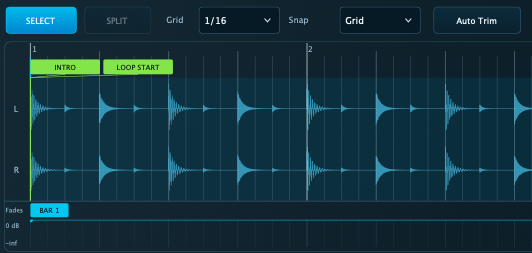
Select the audio phrase to open its waveform. Drag INTRO to the first sound you want to hear, place BAR 1 on the downbeat and move END to the point where the phrase should finish. With a count-in or pickup, leave that material between INTRO and BAR 1. Use Grid to set the spacing and Snap to choose how markers move.
Loop and edge preparation
Place LOOP START and LOOP END around the part you want to repeat. Click Fit Loop to inspect the join, then listen to it through a few repeats. A short crossfade can smooth a click. Use Auto Trim to move the outer edges past silence and Fade In or Fade Out if the start or finish sounds abrupt. These edits leave the source file intact.
Source actions
Open Audio Source Actions… for the selected recording. Find Loop offers places to try. Listen to a candidate and apply it if the join sounds right in context. If you’re working on a Stack, select the audio layer you intend to edit before changing its markers.