Audio Pickup and BAR 1
Keep a count-in or lead-in ahead of the recorded downbeat.
START and BAR 1
Place INTRO or START at the first sound you want to hear, then put BAR 1 on the main downbeat. For a vocal that begins just before the beat, leave the first syllable to the left of BAR 1. Enter the recording’s Source BPM so the grid lines up with the music.
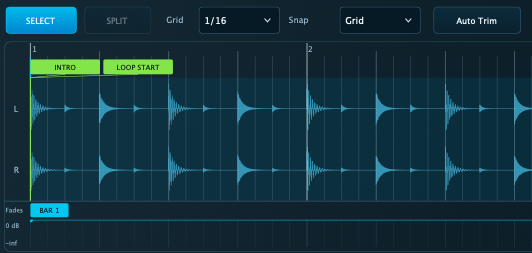
Prepare a pickup
Select the audio phrase and open PLAYBACK. Choose a Pickup value or drag BAR 1 for a custom lead-in. Trigger early enough to hear the pickup before the downbeat. When Pickup is active, it sets the start timing and Quantize Start can be unavailable.
Limits
If you miss the lead-in, try the entry again from an earlier trigger. Pickup Catch-Up applies before BAR 1. Use Original or Match Tempo if the part needs audio Catch-Up.