MIDI piano-roll editor
Change notes, accents and loop markers in a MIDI phrase.
Notes and tools
Choose Pointer to select and move notes, and drag a note edge to change its length. Use Pencil to add notes. Eraser deletes them, while Mute lets you hear the part with a note temporarily silenced. Use Scissors to split a note or Join to put notes together.
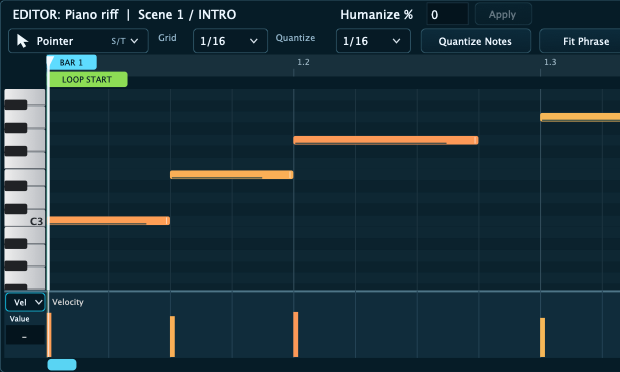
Editing grid and note quantize
Set Grid to the division you want when moving or drawing notes. To tidy up a few notes you played, select them, choose a value and click Quantize Notes. Quantize Start, in PLAYBACK, is for lining up the launch of the whole phrase.
Velocity and controller lanes
Use the Velocity lane below the notes to soften a hit or bring out an accent. Pick another lane when you need to edit CC, pitch bend, program change, pressure or sustain data.
Markers and shortcuts
Place BAR 1 on the downbeat and leave any pickup notes before it. Drag LOOP START and LOOP END around the bars you want to repeat, then move END to the final note or the end of the outro. Use Fit Phrase for the whole part or Fit Loop to look more closely at the repeat.